Pokémon mini Development Documentation
LCD Controller
For more on the LCD hardware as well as raw commands, see here
The LCD Controller, called the PRC in previous documentation as well as commonly in the community, is a subprocess inside the CPU (likely stored in microcode) which renders the frame in RAM then sends it to the LCD.
The controller steps through three stages based on the values in the registers $208A and $2081: render tiles, render sprites, and frame copy. Both rendering stages can be individually disabled.
When it runs a stage, the software is halted and the CPU yields control to the LCD Controller. Thus software effectly loses processor time for each stage.
| Mode | CPU allocation |
|---|---|
| Rendering + Frame Copy | 67.7% PRC, 32.3% Free |
| Frame Copy only | 16.9% PRC, 83.1% Free |
| No Rendering | 0.0% PRC, 100.0% Free |
TODO: reconfirm these numbers, provide test ROM
It shares a portion of RAM spanning $1000~$14E0 (exclusive) maximally with software. A portion of this controls rendering and a portion of this is the actual frame buffer. If, for example, sprites are not used in some software, it’s possible to reclaim that RAM for general use.
Render tiles
In order to enable rendering tiles, $2080 needs to be 0bxxxx1x1x.
- With pm.h, use
PRC_MODE |= COPY_ENABLE | MAP_ENABLE;to enablePRC_MODE &= ~MAP_ENABLE;to disable
Although the microcode is not known, we can presume enough of the process. First it uses internal scroll registers to calculate the portion of the tilemap to render from. It pulls the tile IDs from RAM ($1360+) which it uses to look up tile graphics offset from the tile base, shifts the graphics as required by the scroll values, then blits them to the frame buffer. This step completely overwrites any data currently in the frame buffer.
Note the map size is not considered during rendering, only when setting new values into the scroll registers. If the internal scroll values are in a state inappropriate for the current map, it can regard non-tile IDs as tile IDs, causing an unexpected image.
Although unconfirmed for the real PM, the pokemini emulator runs this step when $2081 is resetting and $208A is 24, before sprites.
Render sprites
In order to enable rendering sprites, $2080 needs to be 0bxxxx11xx.
Each of the sprites you want to use must be individually enabled and positioned in OAM.
- With pm.h, use
PRC_MODE |= COPY_ENABLE | SPRITE_ENABLE;to enable renderingPRC_MODE &= ~SPRITE_ENABLE;to disable renderingOAM[0].ctrl |= OAM_ENABLE;to enable sprite 0OAM[0].ctrl &= ~OAM_ENABLE;to disable sprite 0OAM[0].x = 16; OAM[0].y = 16;to place sprite 0 at the top-left corner of the screen
Although the microcode is not known, we can presume enough of the process. It iterates backwards over the entries in OAM starting at 23 and counting down to 0. If that sprite is enabled and positioned within the screen bounds (0 < x < 96 and 0 < y < 64) it uses the ID to look up the sprite graphics offset from the sprite base which is then potentially flipped, inverted, shifted, cropped, then finally blitted into the frame buffer while respecting its alpha mask.
This means that sprite 0 is always on top, such that if sprite 0 and 1 overlapping, sprite 1 would be occluded (depending on transparency).
Flipping and color inverting the sprite are also options in the ctrl field, as noted in the structure below, accessed via OAM[n] where n is a number between 0 and 23 (inclusive).
| Offset | pm.h field | value / flag |
|---|---|---|
| $00 | x | position |
| $01 | y | position |
| $02 | tile | index |
| $04.0 | ctrl | OAM_FLIPH |
| $04.1 | ctrl | OAM_FLIPV |
| $04.2 | ctrl | OAM_INVERT |
| $04.3 | ctrl | OAM_ENABLE |
A position here can be any value between 0 and 128 (exclusive); the MSB is ignored so a value of 128 functions the same as 0. This value is an offset from the top left of the “field”. The field position relative to the screen starts at (-16, -16). This allows sprites to be partially visible along the left and top edges of the screen. To place a sprite at certain edges of the screen such that the sprite is fully visible, use these values:
| Corner | x | y |
|---|---|---|
| Top-left | 16 | 16 |
| Top-right | 80 | 16 |
| Bottom-left | 16 | 48 |
| Bottom-right | 80 | 48 |
Although unconfirmed for the real PM, the pokemini emulator runs this step when $2081 is resetting and $208A is 24, after tiles.
Frame copy
In order to enable frame copy, $2080 needs to be 0bxxxx1xxx.
- With pm.h, use
PRC_MODE |= COPY_ENABLE;to enable rendering & frame copyPRC_MODE &= ~COPY_ENABLE;to disable rendering entirely (TODO: confirm)
When the controller reaches this step, it assumes the frame buffer stored at $1000+ is ready, and sends it via LCD commands to the LCD driver over a parallel connection. The copy routine sends the commands one would expect:
- Set page to 0
- Set column (hi then lo) to 0
- Write 96 data bytes to the LCD
- Repeat for next page, up to 7 (inclusive)
Although unconfirmed for the real PM, the pokemini emulator runs this step when $2081 is resetting and $208A is 57.
Frame rate
The CPU generates a clock signal of fOSC1 / 1.75 (~18.725 kHz) on the CL. Each time CL goes low, it also increments the line counter register which starts at 1 and counts to 65. When The LCD alternates the FR line, the CPU resets the line counter to 1 and increases the frame counter register by 1. If this new value equals a value determined by the rate divider register (the Divider column, below) then it will render and copy a new picture on this frame, then reset the frame counter to 0.
According to the S1D15605 manual, given a CL input of 18.725 kHz, the expected frame rate is 18725 Hz / 260 ≈ 72 Hz which corresponds to measurements of the FR line as well. However, the frame divider limits this to a maximum of 72 Hz / 2 = 36 Hz
| $2081.3~1 | Divider | Rate |
|---|---|---|
| 0 0 0 (0) | 3 | 24 Hz |
| 0 0 1 (1) | 6 | 12 Hz |
| 0 1 0 (2) | 9 | 8 Hz |
| 0 1 1 (3) | 12 | 6 Hz |
| 1 0 0 (4) | 2 | 36 Hz |
| 1 0 1 (5) | 4 | 18 Hz |
| 1 1 0 (6) | 6 | 12 Hz |
| 1 1 1 (7) | 8 | 9 Hz |
Scrolling
The map can be scrolled in both the X and Y directions by modifying the $2086 and $2087 registers, respectively. These registers represent a number of pixels to scroll, not tiles. These registers are 7-bit, so the technical maximum is 127, though no map size allows this.
These values do not wrap the screen but are instead soft capped to stay within the map size. Assigning a higher value will simply not scroll the screen.
| Index | Size (WxH) | Max X scroll | Max Y scroll |
|---|---|---|---|
| 0 | 12 x 16 | 0 | 64 |
| 1 | 16 x 12 | 32 | 32 |
| 2 | 24 x 8 | 96 | 0 |
| 3 | 24 x 16 | 96 | 64 |
When either $2086 or $2087 is set, it checks if the value is valid within the current map size, and, if so, copies it to an internal register. Changing the map size does not validate the current values, and can cause the controller to render unexpected data as tiles.
Drawing directly to the frame buffer
With tile and sprite rendering off, one can simply draw directly to the frame buffer and allow the controller to copy the contents to the LCD. However, if you want to retain rendering you have to draw after the rendering is complete. Since tile and sprite rendering happens at the same time, it’s not possible to draw between them without halving the frame rate to draw the sprites separately.
TODO: how to draw after render
Gray emulation
In order to render 3-color graphics, you can create two sheets of graphics with a checkerboard pattern in the gray portion such that a “gray” pixel is black in one sheet and white in the other.
Set up a global variable to track even an odd frames. During your vsync method, invert this value (such as with Grays ^= 1;). When the value is 0, set the tile or sprite base as one of the sheets. When the value is non-zero, set the base as the other sheet.
This way, the gray pixels will rapidly oscillate between black and white, causing the screen to ghost a half-tone pixel. Keep in mind that this works best for images which don’t move much. Action games will look better sticking to black and white (for example, like Pokémon Race mini does).
Doubling sprites
In order to use up to 48 sprites instead of only 24, you can render them over two frames, effectively halving the frame rate further (max 16 Hz).
In order to do this, track even and odd frames the same as you would for emulating grays then render like so:
- Initially:
PRC_MODE |= COPY_ENABLE | SPRITE_ENABLE;
- On even frames:
PRC_MODE |= MAP_ENABLE;- Assign your first 24 sprites to OAM, these will draw under the next 24
- On odd frames:
PRC_MODE &= ~MAP_ENABLE;- Assign your next 24 sprites to OAM
Since the second frame disables the map, the graphics currently in the frame buffer do not get cleared, and the renderer simply draws the new sprites over top of what’s there.
While technically you could leave the map disabled and continue to draw more sprites, the slow frame rate makes it unreasonable past doubling.
Tile graphics format
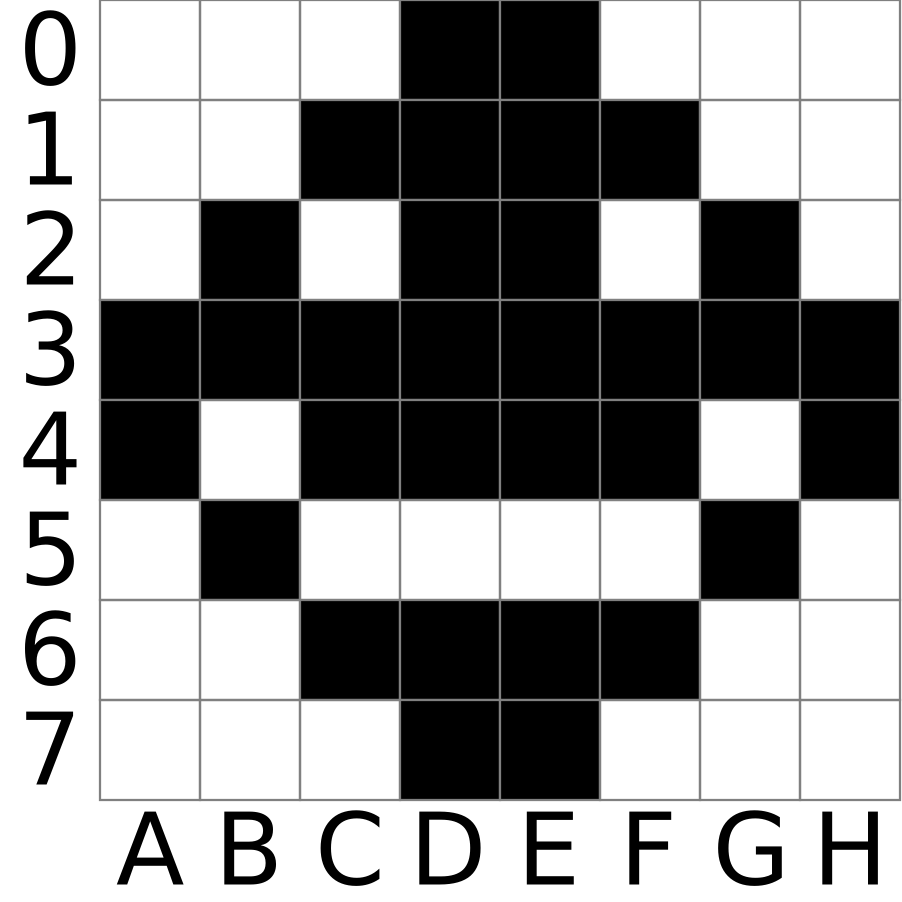
A tile is 8x8 pixels stored as 1 bpp</addr> bitmap data. This makes a tile 8 bytes in size. Each byte represents a column of data, the MSB of which is the bottom-most pixel.
Without map inversion on, a bit of 0 = white and 1 = black.
For example, the data 18 2C 5A DF DF 5A 2C 18 would look like the following:
Sprite graphics format
A sprite is a 2x2 group of tiles which is drawn over the tilemap. It has both graphical data and an alpha mask.
The tile order is: mask (top-left), mask (bottom-left), data (top-left), data (bottom-left), mask (top-right), mask (bottom-right), data (top-right), data (bottom-right). Rendered as tables:
| Data | Mask | ||
|---|---|---|---|
| 2 | 6 | 0 | 4 |
| 3 | 7 | 1 | 5 |
Like tiles, a data bit of 0 = white and 1 = black. This can be inverted per sprite with an OAM flag. A mask bit of 0 = opaque and 1 = transparent.
This allows blitting to the frame buffer with a formula of BUFF = (BUFF & MASK) | (DATA & ~MASK)
In commercial games, a transparent bit has a corresponding data bit of 1, but it renders the same either way.